Thursday, February 3, 2011
by Andy Kurnia Prayoga Made
The first way :
select the video you want to download, play the video until it is finished, do not close your browser. Search / tmp in the Filesystem. There is a file extension. flash and then copy the files. flash. After that play video on your favorite video player.
The second way :
install youtube-dl application with the following syntax:

Good luck !!!
source : http://opensource.telkomspeedy.com/wiki/index.php/Cara_mudah_download_video_dari_youtube_di_Ubuntu
select the video you want to download, play the video until it is finished, do not close your browser. Search / tmp in the Filesystem. There is a file extension. flash and then copy the files. flash. After that play video on your favorite video player.
The second way :
install youtube-dl application with the following syntax:
sudo apt-get install youtube-dlthen copy the url of the video that you select in syntak following :
youtube-dl [url-video-in-youtube]

Good luck !!!
source : http://opensource.telkomspeedy.com/wiki/index.php/Cara_mudah_download_video_dari_youtube_di_Ubuntu
by Andy Kurnia Prayoga Made
A simple way to block porn sites using the Firefox browser.

Website : http://www.inspiredeffect.com/FoxFilter

Website : https://addons.mozilla.org/en-US/firefox/user/32208
Good Luck !!!
- Install Firefox.
- click Tools -> Add Ons.
- Enter the keyword "Parental Control"
- Select Add ons that you like
- Click the "Add to Firefox"
- FoxFilter - Recently called "THE Parental Control for Firefox"! FoxFilter is a personal content filter that helps block pornographic and other inappropriate content. All filtering features are free! Premium features available with small support fee.

Website : http://www.inspiredeffect.com/FoxFilter
- BlockSite - BlockSite is an extension, which automagically blocks websites of your choice. Additionally, this extension will disable all hyperlinks to these websites, by just displaying the link text without the clicking functionality

Website : https://addons.mozilla.org/en-US/firefox/user/32208
Good Luck !!!
Saturday, January 29, 2011
by Andy Kurnia Prayoga Made

Description:
This program has a format .exe, the program was created with applications Driver Genius Professional Edition 10, prepared by backing up all the drivers from the Toshiba Satellite L510 laptop with operating system Windows 7 Home Premium. To run this program is very easy, after you reinstall your laptop with the new windows, run this program by right click and select Run as administrator and then follow the steps there. After all is finished restart your laptop and all the drivers already installed on your laptop.
Good luck !!!
Good luck !!!
by Andy Kurnia Prayoga Made

1. Online Home Courses
http://www.1-language.com/englishcourse/index.htm
This site has been standing long enough and provides free English-language course that is easy for its users, most users of this site is people asia.
2. Free Home Language Lessons
http://english-online.org.uk/course
Providers of online courses from the UK was supported by a number of organizations and universities to provide the materials. There are various categories: writing, speaking and English-language reading comprehension.
3. Test, Learn & Study Online Home
http://www.world-english.org
Here you can find the categories of English language tests to test your English language skills, learn English and directed by some sub-categories.
4. Advanced Home Lessons
http://www.englishpage.com/index.html
Courses are offered from this site is to learn English for those who can already basics of English. This program is perfect if you want to deepen their reading ability to read and understand the English language that you often find in the literature books or the Internet.
5. Free Home Online Classes
http://www.eslgo.com/classes.html
Classes online at this site offers a variety of learning english language starting from grammar, writing, reading and levels such as beginner, intermediate and advanced.
6. Learning English
http://www.bbc.co.uk/worldservice/learningenglish/
Courses from the BBC, one of the leading broadcasting media and the world's oldest English-language provides online courses that are also accompanied by an audio aid to improve the ability to hear and speak.
7. Essential Lessons for Beginning Home Learners
http://esl.about.com/od/beginningenglish/ig/Basic-English/index.htm
If you are a beginner to learn English, here you can see an important and simple lesson for beginners in order to facilitate you to learn.
8. Home Activities Online for Kids
http://www.syvum.com/online/english.html
If you have a child, brother or pupil, then this site can help them to learn English with the help of some simple visualization and interesting pictures for children.
9. Visual Home Activities for ESL Students
http://www.visualesl.com
Visual learning english for elementary and junior high students have a variety of features such as images and audio to train pronunciation, conversation and so forth.
10. Activities for ESL Students
http://a4esl.org
The site is almost similar to VisualESL above, but with the material and the interface of different sites.
11. ESL Online Learning Games
http://www.eslkidstuff.com/OnlineGamesMain.htm
Learning english for children to be more exciting for the child when visualized with the game. You can find the games interesting to learn here.
12. Learning English for Kids
http://www.britishcouncil.org/kids.htm
Learn english online tutoring provided by the famous British cultural institution has a lot of media, materials and learning category.
13. ESL and TOEFL Online Courses
http://www.worldwidelearn.com/language-courses/esl-course.htm
Here you can find an online course English for ESL or TOEFL.
source : http://stmikbandungbali.ac.id
Monday, January 24, 2011
by Andy Kurnia Prayoga Made
Netcut is one application to control Internet access at a hotspot area, we like as a server at the hotspot area, with netcut we can decide on access to other users in the network with just one click. Allowable bandwidth on these networks can be easily mastered. Obviously this is very beneficial when we are in we will download or upload files from or to the internet. To be able to get it click the following link

Once downloaded, install the application on your laptop computer, then restart. Then run the application again and run your mission. To disconnect a PC that is connected at a hotspot network is just select one of the connected PC data list and then click Cut Off
Surely this is very detrimental to other users on the network. Then made an application to counteract the influence of these Netcut program. His name is "Anti Netcut". With Anti Netcut we can avoid the evil influence Netcut users. With Anti Netcut we can also monitor any people - people who use the program Netcut.
To get the program please click the following link


Once downloaded, install the application on your laptop computer, then restart. Then run the application again and run your mission. To disconnect a PC that is connected at a hotspot network is just select one of the connected PC data list and then click Cut Off
Surely this is very detrimental to other users on the network. Then made an application to counteract the influence of these Netcut program. His name is "Anti Netcut". With Anti Netcut we can avoid the evil influence Netcut users. With Anti Netcut we can also monitor any people - people who use the program Netcut.
To get the program please click the following link

by Andy Kurnia Prayoga Made
Description: This application uses PHP and MySQL for the database. This application is based website. Application is made to store student data in the database and display the data in the form of websites. This application was made on the local computer, so to run it have to use XAMPP as the server. For more details, we just headed to the practice of manufacture.
Create a database with MySQL. The following syntax from the application database
Here's the download link from the source code for this application
Student Information System - Click Here
After downloading it and then extract the file in the folder where you installed the htdocs in your XAMPP. You can use Dreamweaver to edit the look and configuration of this application.
Then run the application on your browser. I use Mozilla Firefox to view this website. Here's the view of this application

Good luck!
Create a database with MySQL. The following syntax from the application database
CREATE DATABASE mhsstikom

DROP TABLE IF EXISTS `mhsstikom`.`mahasiswa`;
CREATE TABLE IF NOT EXISTS `mhsstikom`.`mahasiswa` (
  `nim` VARCHAR(9) NOT NULL DEFAULT '' ,
  `nama` VARCHAR(30) NOT NULL DEFAULT '' ,
  `tgllahir` DATE NOT NULL DEFAULT '0000-00-00' ,
  `jenkel` ENUM('0','1') NOT NULL DEFAULT '0' ,
  `alamat` TEXT NOT NULL DEFAULT '' ,
  `namafoto` VARCHAR(50) NOT NULL DEFAULT '' ,
  PRIMARY KEY (`nim`),
  UNIQUE KEY nim (`nim`),
   KEY nim_2 (`nim`)
);
Here's the download link from the source code for this application
Student Information System - Click Here
After downloading it and then extract the file in the folder where you installed the htdocs in your XAMPP. You can use Dreamweaver to edit the look and configuration of this application.
Then run the application on your browser. I use Mozilla Firefox to view this website. Here's the view of this application
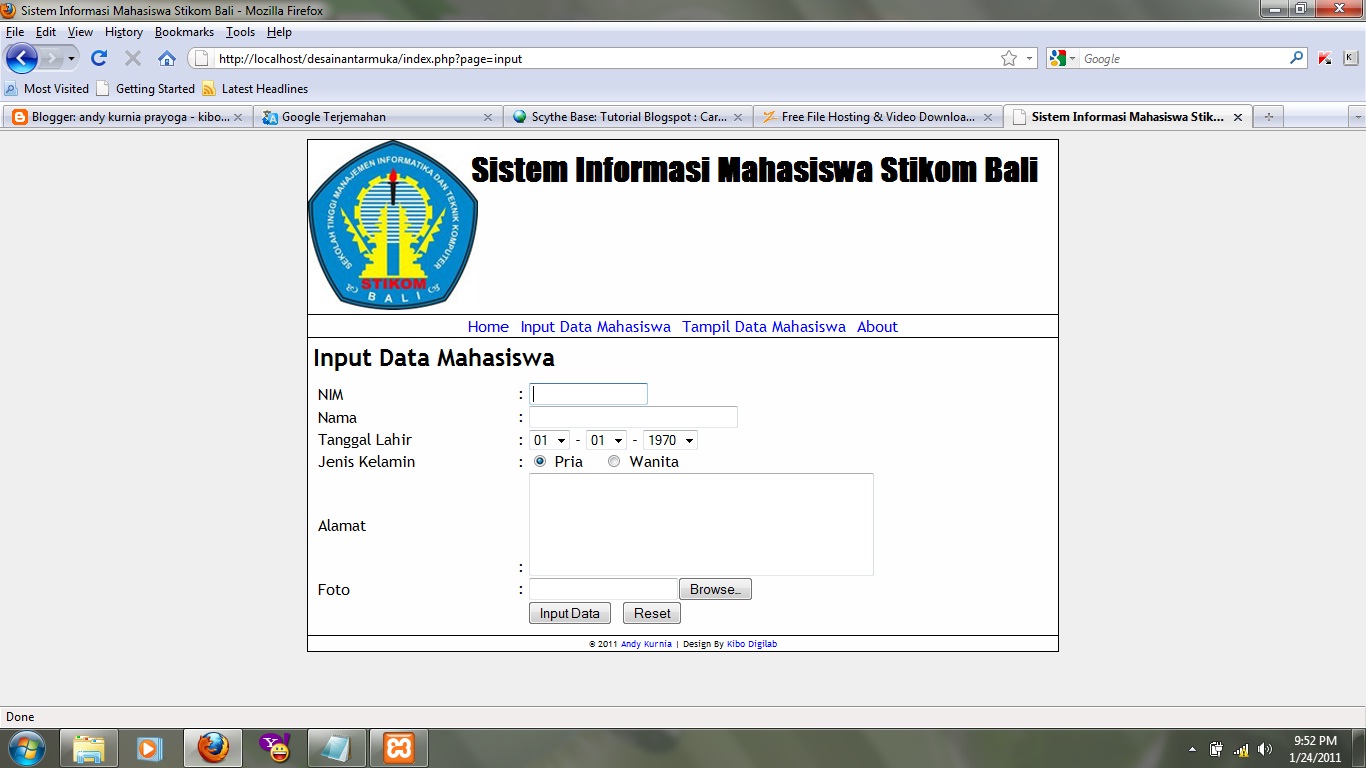
Good luck!
Wednesday, January 5, 2011
by Andy Kurnia Prayoga Made
if you create a blog using blogger.com service will display the default icon blogger will decorate your blog name in the address bar of your browser. To replace it easy enough. You can just add the following script on the script some of your blog template. Here are the steps
1. Login to your blogger
2. Then select the design - the edit html
3. Search
4. Then before the code is type the following script
5. Replace http://msp244.photobucket.com/albums/gg19/MaxineLemonade/monkey.gif with the image url of your choice
7. Good luck!

1. Login to your blogger
2. Then select the design - the edit html
3. Search
4. Then before the code is type the following script
<link href='http://msp244.photobucket.com/albums/gg19/MaxineLemonade/monkey.gif' rel='SHORTCUT ICON'/>
5. Replace http://msp244.photobucket.com/albums/gg19/MaxineLemonade/monkey.gif with the image url of your choice
- use an image with size 32 x 32 or 48 x 48
- url can be found by searching your favorite pictures in image.google.com or you can upload your own pictures on sites like photobucket or something else and then get the address of your image file
7. Good luck!
Wednesday, December 22, 2010
by Andy Kurnia Prayoga Made
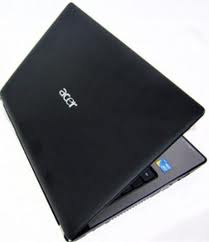

Merk : Acer
Type : AS4741G-464G64Mn
Proccessor : Intel Core i5-M460 2,53GHz
RAM : 4 GB DDR3
Harddisk : 640 GB
VGA : Nvidia Optimus GT420M/1626MB dedicated 128MB
Features : WebCam, CardReader, Bluetooth,HDMI,WIFI, LAN
OS : Windows 7 Home Premium
Display : 14,0"HD Led LCD
Optical Drive : DVDRW
Color : Black
Price : Rp 7.400.000,00
Location : Gorinet Laptop - Jl. Trengguli no. 100
Denpasar
Bali - Indonesia
If you are interested, please leave a comment !!!
Tuesday, December 21, 2010
by Andy Kurnia Prayoga Made
For download please click this image

What's new at Yahoo Messenger 11
- Play socially - Can play the most popular social game with your friends, starting with offerings from Zynga games, Elex, and others.
- Management of all your social jariangan - With Y! This latest version of your status, you can simultaneously in Yahoo! Pulse, Facebook, and Twitter. And most interesting to chat with your facebook friends.
Monday, December 20, 2010
by Andy Kurnia Prayoga Made
Here is a program that is named Timer.exe, this program serves to perform shutdown, logoff, reboot or display messages. This program has an interface very simple and easy to use. You can just set the time and you can select events to be run. Here's a screenshot of this program

To get this program please click the link below
http://www.ziddu.com/download/13062581/Timer.exe.html
Good luck!
To get this program please click the link below
http://www.ziddu.com/download/13062581/Timer.exe.html
Good luck!
by Andy Kurnia Prayoga Made

For downnload please click this link : http://www.ziddu.com/download/13054032/DriverGeniusProfessional10.0.0.526.rar.html
password rar : kibo-digilabDriver Genius Pro 10.0.0.526
1) Install Driver Genius Pro 10 (drvgenpro.exe)
2) Copy/paste the "DriverGenius.exe" file into installdir, by default:
C:\Program Files\Driver-Soft\DriverGenius
and confirm to overwrite existing file.
3) Make DriverGenius.exe read only so the upgrade process cannot overwrite
the cracked executable
3) Start Driver Genius. Go to: Help / Enter Code
serial: BAQZHSQMQPY3X9PVHGHXYX3ZGSPRTTBJEQ66
That's all.
Saturday, December 18, 2010
by Andy Kurnia Prayoga Made
For download, please click image

Instruction :
1. Extract the file that your download
3. Run the patch ( run as administrator )
4. Good Luck !!!
Instruction :
1. Extract the file that your download
password : kibo-digilab2. Install IDM
3. Run the patch ( run as administrator )
4. Good Luck !!!
Thursday, December 16, 2010
by Andy Kurnia Prayoga Made
Here I give a little information about the websites that can translate your documents quickly and well. If you have a document in the form. doc,. pdf, and others, you can directly translate into the language in which language you want. You do not need to type one by one the words in your document it. Just by looking your file which is stored in a storage media such as hard drives or flash, then upload and translate the following website.
http: / / translate.google.com
or with
http://www.onlinedoctranslator.com/translator.html
(you need the java runtime environment to use the translator on this website)
good luck!!!

by Andy Kurnia Prayoga Made
Here are the steps to activate Adobe CS5 Master Collection
1. Download keygen below. Please click image

2. Extract the files that you download
4. Then click the hosts file patch
5. After that install the Adobe CS5 Master Collection you.
6. Run the keygen again to obtain the serial number
7. Done and good luck!!!
1. Download keygen below. Please click image
2. Extract the files that you download
password : kibo-digilab3. Then run the keygen.exe (run as administrator)
4. Then click the hosts file patch
5. After that install the Adobe CS5 Master Collection you.
6. Run the keygen again to obtain the serial number
7. Done and good luck!!!
Monday, December 13, 2010
by Andy Kurnia Prayoga Made
Click image for download patch Janus WinForm

Notes:
1. Extract the files that you download
2. Then run JanusPatcher.exe
3. Good luck
Notes:
1. Extract the files that you download
2. Then run JanusPatcher.exe
3. Good luck
Monday, November 29, 2010
by Andy Kurnia Prayoga Made
Kaspersky 2011 Crack
This crack activates Kaspersky for 3700 days; and the installed key will not be blocked, even after updates !
It works with Kaspersky Antivirus & Internet Security 2011.
It works with all languages, and all versions of windows 32bit and 64bit.
Instructions:
1. Remove any installed keys.
2. Disable Self-Defense from Kaspersky settings.
3. Exit Kaspersky.
4. Install the crack.
5. Enjoy !!
For download please click this image
 password : kibo-digilab
This crack activates Kaspersky for 3700 days; and the installed key will not be blocked, even after updates !
It works with Kaspersky Antivirus & Internet Security 2011.
It works with all languages, and all versions of windows 32bit and 64bit.
Instructions:
1. Remove any installed keys.
2. Disable Self-Defense from Kaspersky settings.
3. Exit Kaspersky.
4. Install the crack.
5. Enjoy !!
For download please click this image
by Andy Kurnia Prayoga Made
For download please click this image
 password : kibo-digilab
Sunday, November 28, 2010
by Andy Kurnia Prayoga Made
for install type the following code in your terminal

source : http://opensource.telkomspeedy.com/wiki/index.php/Instalasi_Google_Earth
sudo apt-get install googleearth
Make google earth package
Another alternativemake-googleearth-package --help
Uninstallsudo apt-get install googleearth-package make-googleearth-package make-googleearth-package --force sudo dpkg -i googleearth_5.2.1.1329+0.5.7-1_i386.deb
sudo rm -rf /opt/google-earth && sudo rm /usr/share/mime/application/vnd.google-earth.* \
/usr/share/mimelnk/application/vnd.google-earth.* /usr/share/applnk/Google-googleearth.desktop \
/usr/share/mime/packages/googleearth-mimetypes.xml /usr/share/gnome/apps/Google-googleearth.desktop \
/usr/share/applications/Google-googleearth.desktop /usr/local/bin/googleearth

source : http://opensource.telkomspeedy.com/wiki/index.php/Instalasi_Google_Earth
by Andy Kurnia Prayoga Made
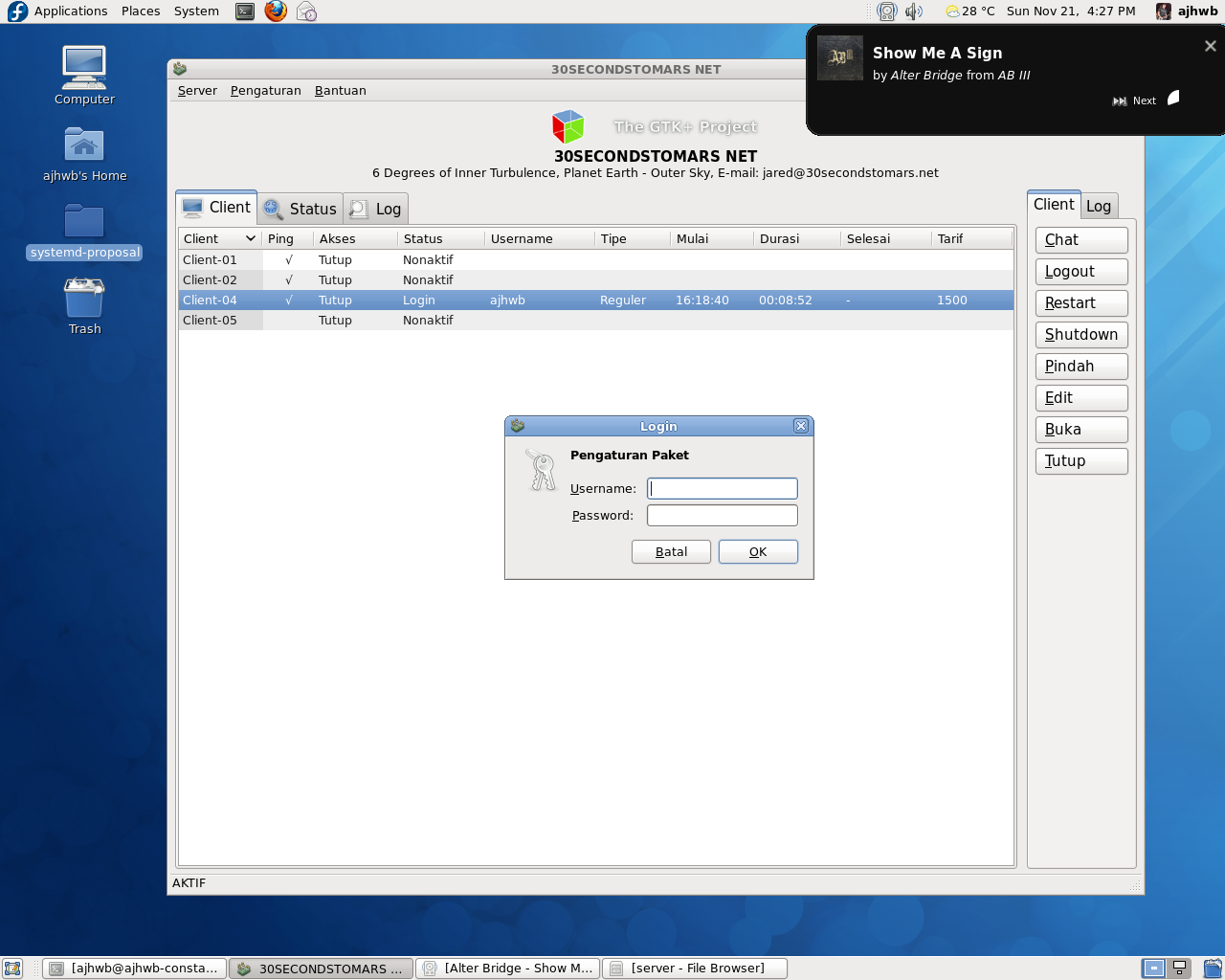
gBilling is a payment system application cafe (cafe billing system) which consists of server and client, gBilling expected to run on a multi-platform (Linux, BSD, MacOS, or Microsoft Windows). gBilling written in C language, with a GTK2 GUI toolkit (The GIMP Toolkit), and using SQLite as database systems and data storage. gBilling will always be under the GNU Public License (GPL) version 2
GBilling Features:
* Multiplatform (UNIX: Linux, MacOS, BSD, and Microsoft Windows) to 32 bit architecture and 64 bits
* Concurrent TCP / IP server model (IPv4)
* Multithreaded (per-client thread, with GLib Thread)
* Orientation storage database (SQLite embedding)
* Full control of the server (logout, shutdown, restart, close / open the login client)
* Detect the client is not active (inactive client program or client computer)
* System logging and log export to CSV format
* Recovery (data recovery server / client for the power loss, system crashes)
* User authentication (GLib data hashing)
* Chat
* System package
* System Item (Items that are sold in the cafe is displayed at the client)
* Customization according to your internet cafe (cafe name, slogan, address)
* Free software
Compilation and installation on Linux
To compile gBilling in Linux, you need the following libraries:
* GTK> = 2.18.9
* GLib> = 2.22.5 (with gthread> = 2.22.5)
* SQLite> = 3:41 (only for gBilling Server version 0.1 down)
* Libglade> = 2.6.0 (only for version 0.1 down)
Note: There are some Linux distributions which do not provide C header files for libglade2 like in Mandriva Free 2008. You can get these files from the GNOME website.
Make sure the libraries are already installed and configured correctly on your system, gBilling been packaged with a standard script installation GNU (autoconf, automake, libtool). Compilation and installation gBilling with other GNU standard package.
Download the latest version of gBilling gBilling Server and Client, compilation and installation with super-user account (root) as follows:
You can also specify the location of the installation with the configuration:
This will install in the directory / opt / gbilling-server.
To delete a file-file compilation:
To delete all the files the compilation and configuration:
To uninstall do the following:
For more information, please see the INSTALL file in the package gBilling gBilling Server or Client.
After installation run gBilling gBilling Server or Client from the menu or directly from the shell, do the settings for the server as set up a username and password server, client, and logs.
Important: Username and password gBilling default on version 0.2 upwards is admin: gbilling, in version 0.1 are we: rock
download server gBilling : http://sourceforge.net/projects/gbilling/files/gbilling-server/0.2/gbilling-server-0.2.1-rc1.tar.gz/download
download client gBilling : http://sourceforge.net/projects/gbilling/files/gbilling-client/0.2/gbilling-client-0.2.1-rc1.tar.gz/download

source : http://gbilling.sourceforge.net/
GBilling Features:
* Multiplatform (UNIX: Linux, MacOS, BSD, and Microsoft Windows) to 32 bit architecture and 64 bits
* Concurrent TCP / IP server model (IPv4)
* Multithreaded (per-client thread, with GLib Thread)
* Orientation storage database (SQLite embedding)
* Full control of the server (logout, shutdown, restart, close / open the login client)
* Detect the client is not active (inactive client program or client computer)
* System logging and log export to CSV format
* Recovery (data recovery server / client for the power loss, system crashes)
* User authentication (GLib data hashing)
* Chat
* System package
* System Item (Items that are sold in the cafe is displayed at the client)
* Customization according to your internet cafe (cafe name, slogan, address)
* Free software
Compilation and installation on Linux
To compile gBilling in Linux, you need the following libraries:
* GTK> = 2.18.9
* GLib> = 2.22.5 (with gthread> = 2.22.5)
* SQLite> = 3:41 (only for gBilling Server version 0.1 down)
* Libglade> = 2.6.0 (only for version 0.1 down)
Note: There are some Linux distributions which do not provide C header files for libglade2 like in Mandriva Free 2008. You can get these files from the GNOME website.
Make sure the libraries are already installed and configured correctly on your system, gBilling been packaged with a standard script installation GNU (autoconf, automake, libtool). Compilation and installation gBilling with other GNU standard package.
Download the latest version of gBilling gBilling Server and Client, compilation and installation with super-user account (root) as follows:
$ tar xzf gbilling-server-x.y.tar.gz
$ cd gbilling-server-x.y
$ ./configure
$ make
$ su -c 'make install'
You can also specify the location of the installation with the configuration:
$ ./configure --prefix=/opt/gbilling-server
This will install in the directory / opt / gbilling-server.
To delete a file-file compilation:
$ make clean
To delete all the files the compilation and configuration:
$ make distclean
To uninstall do the following:
$ su -c 'make uninstall'
For more information, please see the INSTALL file in the package gBilling gBilling Server or Client.
After installation run gBilling gBilling Server or Client from the menu or directly from the shell, do the settings for the server as set up a username and password server, client, and logs.
Important: Username and password gBilling default on version 0.2 upwards is admin: gbilling, in version 0.1 are we: rock
download server gBilling : http://sourceforge.net/projects/gbilling/files/gbilling-server/0.2/gbilling-server-0.2.1-rc1.tar.gz/download
download client gBilling : http://sourceforge.net/projects/gbilling/files/gbilling-client/0.2/gbilling-client-0.2.1-rc1.tar.gz/download

source : http://gbilling.sourceforge.net/
Saturday, November 27, 2010
by Andy Kurnia Prayoga Made
Here I will give info what linux distros have developed in Indonesia. I will also give links to download from each of these Linux distributions. Please download and feel themselves the work of Indonesian nation
Debian based distro

download : http://kuliax.des.net.id/Kuliax-7.0-LiveCD.iso

download 32bit : http://buaya.klas.or.id/pub/blankon/rilis/6.0/blankon-6.0-cdlive-i386.iso
download 64bit : http://buaya.klas.or.id/pub/blankon/rilis/6.0/blankon-6.0-cdlive-amd64.iso

download : http://mirror.unej.ac.id/pub/iso/dewalinux/dewalinux_papuma_3.0.iso

download 32bit : http://voiprakyat.or.id/pub/briker/iso/briker-1.2.iso
download 64bit : http://voiprakyat.or.id/pub/briker/iso/briker-1.2-amd64.iso
RPM based distro

download : http://repo.igos-nusantara.or.id/iso/2010/R5.2/IGN2010-LiveCD-R5.2.ISO
download : http://repo.igos-nusantara.or.id/iso/2010/R5.2/IGN2010-DVD-installer-R5.2.ISO
Slackware based distro

download : http://slackware.vip.net.id/pub/ForumLinux/8.10/forum.linux-8.10.iso

download : http://toko.baliwae.com/download/singkong/singkong-1.0.iso

download : http://target.slackware-id.org/download-manager.php?id=6

download : ftp://dl2.foss-id.web.id/iso/zencafe/2.2/zencafe-2.2.iso
Debian based distro
Kuliax

download : http://kuliax.des.net.id/Kuliax-7.0-LiveCD.iso
BlankOn Linux

download 32bit : http://buaya.klas.or.id/pub/blankon/rilis/6.0/blankon-6.0-cdlive-i386.iso
download 64bit : http://buaya.klas.or.id/pub/blankon/rilis/6.0/blankon-6.0-cdlive-amd64.iso
DewaLinux

download : http://mirror.unej.ac.id/pub/iso/dewalinux/dewalinux_papuma_3.0.iso
Briker

download 32bit : http://voiprakyat.or.id/pub/briker/iso/briker-1.2.iso
download 64bit : http://voiprakyat.or.id/pub/briker/iso/briker-1.2-amd64.iso
RPM based distro
IGOS Nusantara

download : http://repo.igos-nusantara.or.id/iso/2010/R5.2/IGN2010-LiveCD-R5.2.ISO
download : http://repo.igos-nusantara.or.id/iso/2010/R5.2/IGN2010-DVD-installer-R5.2.ISO
Slackware based distro
CD Forum Linux

download : http://slackware.vip.net.id/pub/ForumLinux/8.10/forum.linux-8.10.iso
Singkong Linux

download : http://toko.baliwae.com/download/singkong/singkong-1.0.iso
targeT Linux

download : http://target.slackware-id.org/download-manager.php?id=6
ZenCafe Linux

download : ftp://dl2.foss-id.web.id/iso/zencafe/2.2/zencafe-2.2.iso


Flag Counter


